文章来源:网络作者:曼雁发布时间:2026-08-19 01:47:38
为了文件的安全我们常常会设置密码,那大家晓得excel2007如何撤销保护密码吗?下面就是excel2007撤销保护密码的方法哦。
excel2007撤销保护密码的方法
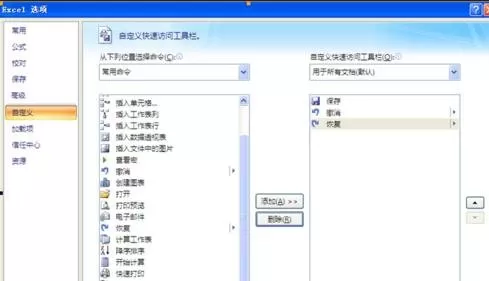
1、打开Excel表格中的Excel选项,选择自定义,得到如下画面:
excel2007撤销保护密码的方法图1
2、然后在左边侧框栏中选择“查看宏”
之后双击或者选择添加按钮,则可以看到右边栏中有了查看宏按钮,之后点击右下角的确定。
3、大家可以在下面这个窗口处看到箭头所指的按钮:
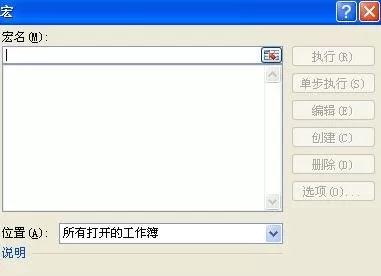
点击按钮,之后弹出窗口:

excel2007撤销保护密码的方法图2
excel2007撤销保护密码的方法图3
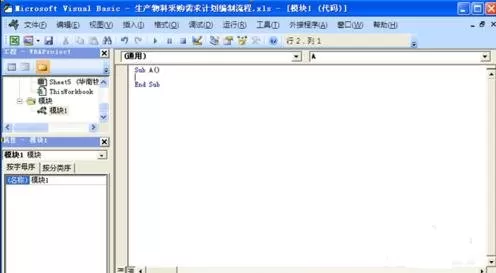
4、在宏名处填写一个名字(可随意),然后点击创建,弹出以下窗口:
excel2007撤销保护密码的方法图4
5、将窗口内的内容全选后删除,然后将下面分割线以内的内容开始复制粘贴在上面的窗口内:
从横线下开始复制
------------------------------------------------------------------------------------------
Option Explicit
Public Sub AllInternalPasswords()
\' Breaks worksheet and workbook structure passwords. Bob McCormick
\' probably originator of base code algorithm modified for coverage
\' of workbook structure / windows passwords and for multiple passwords
\'
\' Norman Harker and JE McGimpsey 27-Dec-2002 (Version 1.1)
\' Modified 2003-Apr-04 by JEM: All msgs to constants, and
\' eliminate one Exit Sub (Version 1.1.1)
\' Reveals hashed passwords NOT original passwords
Const DBLSPACE As String = vbNewLine & vbNewLine
Const AUTHORS As String = DBLSPACE & vbNewLine & _
"Adapted from Bob McCormick base code by" & _
"Norman Harker and JE McGimpsey"
Const HEADER As String = "AllInternalPasswords User Message"
Const VERSION As String = DBLSPACE & "Version 1.1.1 2003-Apr-04"
Const REPBACK As String = DBLSPACE & "Please report failure " & _
"to the microsoft.public.excel.programming newsgroup."
Const ALLCLEAR As String = DBLSPACE & "The workbook should " & _
"now be free of all password protection, so make sure you:" & _
DBLSPACE & "SAVE IT NOW!" & DBLSPACE & "and also" & _
DBLSPACE & "BACKUP!, BACKUP!!, BACKUP!!!" & _
DBLSPACE & "Also, remember that the password was " & _
"put there for a reason. Don\'t stuff up crucial formulas " & _
"or data." & DBLSPACE & "Access and use of some data " & _
"may be an offense. If in doubt, don\'t."
Const MSGNOPWORDS1 As String = "There were no passwords on " & _
"sheets, or workbook structure or windows." & AUTHORS & VERSION
Const MSGNOPWORDS2 As String = "There was no protection to " & _
"workbook structure or windows." & DBLSPACE & _
"Proceeding to unprotect sheets." & AUTHORS & VERSION
Const MSGTAKETIME As String = "After pressing OK button this " & _
"will take some time." & DBLSPACE & "Amount of time " & _
"depends on how many different passwords, the " & _
"passwords, and your computer\'s specification." & DBLSPACE & _
"Just be patient! Make me a coffee!" & AUTHORS & VERSION
Const MSGPWORDFOUND1 As String = "You had a Worksheet " & _
"Structure or Windows Password set." & DBLSPACE & _
"The password found was: " & DBLSPACE & "$$" & DBLSPACE & _
"Note it down for potential future use in other workbooks by " & _
"the same person who set this password." & DBLSPACE & _
"Now to check and clear other passwords." & AUTHORS & VERSION
Const MSGPWORDFOUND2 As String = "You had a Worksheet " & _
"password set." & DBLSPACE & "The password found was: " & _
DBLSPACE & "$$" & DBLSPACE & "Note it down for potential " & _
"future use in other workbooks by same person who " & _
"set this password." & DBLSPACE & "Now to check and clear " & _
"other passwords." & AUTHORS & VERSION
Const MSGONLYONE As String = "Only structure / windows " & _
"protected with the password that was just found." & _
ALLCLEAR & AUTHORS & VERSION & REPBACK
Dim w1 As Worksheet, w2 As Worksheet
Dim i As Integer, j As Integer, k As Integer, l As Integer
Dim m As Integer, n As Integer, i1 As Integer, i2 As Integer
Dim i3 As Integer, i4 As Integer, i5 As Integer, i6 As Integer
Dim PWord1 As String
Dim ShTag As Boolean, WinTag As Boolean
Application.ScreenUpdating = False
With ActiveWorkbook
WinTag = .ProtectStructure Or .ProtectWindows
End With
ShTag = False
For Each w1 In Worksheets
ShTag = ShTag Or w1.ProtectContents
Next w1
If Not ShTag And Not WinTag Then
MsgBox MSGNOPWORDS1, vbInformation, HEADER
Exit Sub
End If
MsgBox MSGTAKETIME, vbInformation, HEADER
If Not WinTag Then
MsgBox MSGNOPWORDS2, vbInformation, HEADER
Else
On Error Resume Next
Do \'dummy do loop
For i = 65 To 66: For j = 65 To 66: For k = 65 To 66
For l = 65 To 66: For m = 65 To 66: For i1 = 65 To 66
For i2 = 65 To 66: For i3 = 65 To 66: For i4 = 65 To 66
For i5 = 65 To 66: For i6 = 65 To 66: For n = 32 To 126
With ActiveWorkbook
.Unprotect Chr(i) & Chr(j) & Chr(k) & _
Chr(l) & Chr(m) & Chr(i1) & Chr(i2) & _
Chr(i3) & Chr(i4) & Chr(i5) & Chr(i6) & Chr(n)
If .ProtectStructure = False And _
.ProtectWindows = False Then
PWord1 = Chr(i) & Chr(j) & Chr(k) & Chr(l) & _
Chr(m) & Chr(i1) & Chr(i2) & Chr(i3) & _
Chr(i4) & Chr(i5) & Chr(i6) & Chr(n)
MsgBox Application.Substitute(MSGPWORDFOUND1, _
"$$", PWord1), vbInformation, HEADER
Exit Do \'Bypass all for...nexts
End If
End With
Next: Next: Next: Next: Next: Next
Next: Next: Next: Next: Next: Next
Loop Until True
On Error GoTo 0
End If
If WinTag And Not ShTag Then
MsgBox MSGONLYONE, vbInformation, HEADER
Exit Sub
End If
On Error Resume Next
For Each w1 In Worksheets
\'Attempt clearance with PWord1
w1.Unprotect PWord1
Next w1
On Error GoTo 0
ShTag = False
For Each w1 In Worksheets
\'Checks for all clear ShTag triggered to 1 if not.
ShTag = ShTag Or w1.ProtectContents
Next w1
If ShTag Then
For Each w1 In Worksheets
With w1
If .ProtectContents Then
On Error Resume Next
Do \'Dummy do loop
For i = 65 To 66: For j = 65 To 66: For k = 65 To 66
For l = 65 To 66: For m = 65 To 66: For i1 = 65 To 66
For i2 = 65 To 66: For i3 = 65 To 66: For i4 = 65 To 66
For i5 = 65 To 66: For i6 = 65 To 66: For n = 32 To 126
.Unprotect Chr(i) & Chr(j) & Chr(k) & _
Chr(l) & Chr(m) & Chr(i1) & Chr(i2) & Chr(i3) & _
Chr(i4) & Chr(i5) & Chr(i6) & Chr(n)
If Not .ProtectContents Then
PWord1 = Chr(i) & Chr(j) & Chr(k) & Chr(l) & _
Chr(m) & Chr(i1) & Chr(i2) & Chr(i3) & _
Chr(i4) & Chr(i5) & Chr(i6) & Chr(n)
MsgBox Application.Substitute(MSGPWORDFOUND2, _
"$$", PWord1), vbInformation, HEADER
\'leverage finding Pword by trying on other sheets
For Each w2 In Worksheets
w2.Unprotect PWord1
Next w2
Exit Do \'Bypass all for...nexts
End If
Next: Next: Next: Next: Next: Next
Next: Next: Next: Next: Next: Next
Loop Until True
On Error GoTo 0
End If
End With
Next w1
End If
MsgBox ALLCLEAR & AUTHORS & VERSION & REPBACK, vbInformation, HEADER
End Sub
-----------------------------------------------------------------------------------------
复制到横线以上
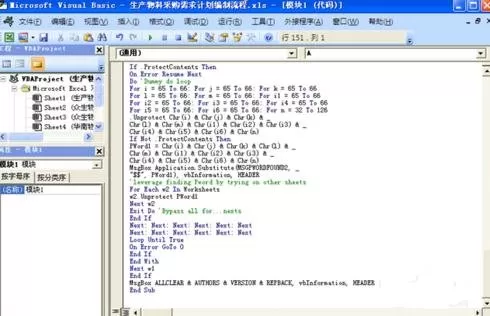
得到情况如下图表示
excel2007撤销保护密码的方法图5
6、关闭编辑窗口;
7、依次点击菜单栏上的工具---宏-----宏,选AllInternalPasswords,运行,确定两次;
等一会,就会出现以下对话框:这就是Excel密码对应的原始密码(此密码和原先设置的密码都能打开此文档。如果是别人的文档,你又想恢复密码设置,就可以用此密码进行保护,他就能用他设置的密码打开,你可以试试,很有趣的。字母一定要大写):
再点击确定。Excel的原始密码就被清除了!!
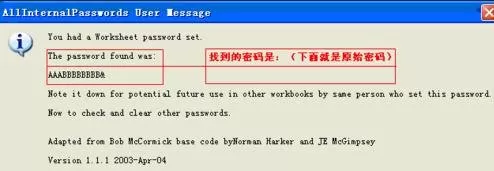
excel2007撤销保护密码的方法图6
8、最后记得关闭EXCEL文档时要保存,否则下回打开,文档仍旧处于只读状态而无法修改。
以上就是excel2007撤销保护密码的方法,希望可以帮助到大家。

禁地之战(乾马金龙专属)
超变传奇996传奇
乾马金龙专属 全新三职业神器,上线领豪礼,爽玩!

王者霸业(王斩切割爆爆爆)
超变传奇
王斩切割爆爆爆 上线即送自动拾取、自动回收

烈焰之怒(骷髅超变日送10万...
超变传奇996传奇
骷髅超变日送10万 上线免费送刀刀绿毒刀刀冰冻自动回收,无条件登录就送10万充值货币!

铸兵之王(百亿直购送充爆)
超变传奇996传奇
百亿直购送充爆 自动拾取 自动回收 攻速全满 直升10000级 六大终极装备

江湖我最牛(GM狂送真充超超...
超变传奇996传奇
GM狂送真充超超变 全新超变几率触发GM手机,狂送真充红包

斗转武林(竹火百锻默爆)
超变传奇996传奇
竹火百锻默爆 上线福利:自动拾取、自动回收、更多豪礼在线相送!!

战影破穹(百亿送充神技觉醒...
超变传奇996传奇
百亿送充神技觉醒 上线即送自动回收、自动拾取等!

苍穹之剑2(帝煞古兵专属)
超变传奇996传奇
帝煞古兵专属 上线即送自动拾取、自动回收

摸金之路(无限超变天天送百...
超变传奇996传奇
无限超变天天送百万 超爽直购币白漂版本,天天送百万直购币!

国战来了(3.5折免费版)
策略
3.5折免费版 3.5折免费,每天送100限时代金券

《逆战:未来》张杰福利放送:杰...